If your ecommerce website is receiving impressions but not enough clicks, enquiries or sales, the issue may not be your product range. It may be the type of content you are publishing, the pages you are prioritising and how closely each page matches what shoppers want to find.
The most effective ecommerce SEO content mix covers the entire buying journey. Product and category pages capture commercial searches, while buying guides, comparisons, FAQs and educational articles help shoppers make decisions. Supporting formats such as reviews, videos, visual assets and brand pages can build trust and strengthen the connections between important pages.
This guide explains the main types of ecommerce SEO content, what each format is designed to achieve, and how a small or growing ecommerce business can choose a practical mix without creating hundreds of low-value pages. It also explains how Ammpli uses Google Search Console data, competitor research, search-intent analysis and semantic keyword mapping to identify realistic opportunities before content is created.
What Is Ecommerce SEO Content?
Ecommerce SEO content is any useful, searchable content that helps an online store attract qualified visitors and guide them towards a purchase. This includes visible page copy, metadata, product information, buying resources, customer reviews, videos, comparison pages and structured content such as FAQs.
Different formats serve different search intents. A page targeting “buy ergonomic office chair” needs a different structure from an article targeting “how to choose an ergonomic office chair”. Matching the page type to the search intent is one of the foundations of effective SEO for ecommerce.
Why Your Ecommerce Website Needs More Than Product Descriptions
Product pages matter, but they cannot answer every question a prospective customer has. Shoppers may want to compare options, understand materials, check compatibility, find a local supplier, learn how to use a product or confirm delivery and returns information before they buy.
A broader content strategy gives search engines more relevant pages to understand and gives shoppers more opportunities to discover your brand. It can also reduce reliance on paid advertising by building organic visibility around product, category and informational searches.
For small and growing ecommerce brands in the United Kingdom and English-speaking international markets, the practical challenge is deciding where to focus limited time and budget. Publishing every possible format at once usually creates inconsistency. A smaller set of well-planned formats is more useful than a large library of disconnected pages.
15 Types of Ecommerce SEO Content to Use
1. Product Pages
Product pages are usually the closest content asset to a transaction. They should target specific searches involving product names, models, materials, sizes, colours, features and use cases.
A strong product page includes an original title, clear description, benefits, specifications, images, descriptive alt text, pricing, stock status, delivery and returns information, reviews, related products and relevant structured data. Avoid copying manufacturer descriptions across your catalogue. Original content helps explain why the product is useful for your audience and gives each page a clearer purpose.
Product information should answer practical buying questions. Instead of only stating that a product is made from stainless steel, explain how that material affects durability, cleaning or suitability for a particular environment.
2. Ecommerce Category and Collection Pages
Category pages group related products and often target broader commercial searches than individual product pages. They can rank for terms such as “women’s waterproof jackets”, “office furniture online” or “industrial safety equipment”.
Optimised category pages need more than a product grid. Include a useful introduction, a clear H1, relevant metadata, subcategory links, filters that support shopping, descriptive images, internal links and helpful content below the products.
Each category should have unique copy that reflects the products and the customer’s needs. A short explanation can help shoppers understand what is included, while additional headings can cover product types, selection criteria, applications and common questions.
3. Brand Pages
Brand pages are valuable when customers search for a specific manufacturer alongside a product category. Searches such as a brand name combined with “running shoes”, “laptops” or “coffee equipment” often show clear commercial intent.
A useful brand page can explain the brand’s positioning, product range, key features, price level and relevant categories. Link from the brand page to products and categories that shoppers can browse next.
Do not create a page for every brand automatically without checking demand or adding useful information. A thin page containing only a logo and product grid is unlikely to provide a strong search experience.
4. Faceted and Filter-Based Pages
Filters help shoppers find products by colour, size, material, price, application or other attributes. Some filtered combinations also represent valuable long-tail searches, such as “waterproof hiking boots for women” or “oak dining tables under a specific budget”.
Not every filter combination should be indexed. Uncontrolled faceted navigation can create thousands of near-duplicate URLs, waste crawling resources and weaken the site’s structure. Only create dedicated, indexable pages where there is clear search demand and enough unique value to justify the page.
Use canonicalisation, noindex rules or other technical controls where appropriate. The correct implementation depends on the platform, URL structure and the value of each combination.
5. Buying Guides
Buying guides target shoppers who know they need a product but have not decided which option is right. They can capture commercial investigation searches such as “how to choose a coffee grinder” or “what office chair is best for back support”.
A useful guide explains the selection criteria, compares relevant features and links naturally to suitable categories and products. It should help the reader make a decision rather than simply repeat product specifications.
Buying guides also support internal linking. A guide about choosing hiking footwear can link to waterproof boots, trail shoes, size information and care instructions, creating a connected journey from research to purchase.
6. Product Comparison Pages
Comparison pages address searches where shoppers are evaluating two or more options. Examples include “manual versus electric coffee grinders”, “standing desk versus traditional desk” and “Product A versus Product B”.
Good comparisons use consistent criteria, explain which type of buyer each option suits and avoid unsupported claims. Include differences in features, materials, capacity, compatibility, price range, maintenance and intended use where those factors matter.
Comparison content works best when it leads to clear next steps. Link to the relevant products, category pages or buying guides without forcing the reader towards an option that does not match their needs.
7. Best-Of and Use-Case Pages
Best-of pages target searches such as “best office chair for a small room” or “best gifts for new homeowners”. They are commercial pages, but the reader often needs guidance before selecting a product.
These pages need genuine selection criteria. Explain why each item appears, who it suits and where it may not be suitable. A short list of relevant products with meaningful analysis is more useful than a long catalogue with shallow descriptions.
Use-case pages can also support seasonal or audience-specific demand, provided the page offers distinct value rather than simply changing a few words in a template.
8. How-To Guides
How-to content answers practical questions before and after purchase. Examples include how to clean a coffee machine, how to measure for a desk, how to install a product or how to care for a particular material.
Use clear headings, numbered steps, concise instructions and warnings about common mistakes. Include images or video where they genuinely improve understanding.
Link from each guide to products, accessories and related resources. This helps informational visitors discover relevant commercial pages without making the article feel like an advertisement.
9. FAQ Content
FAQs address specific questions that may prevent a purchase. Common subjects include sizing, compatibility, delivery, installation, warranties, returns, materials and maintenance.
FAQs can appear on product pages, category pages, service pages or as a dedicated resource. Keep each answer direct and make sure it matches the information shown elsewhere on the site.
Use structured data only when the questions and answers are visible to users and meet search-engine guidelines. Markup does not guarantee enhanced search results, but accurate structured data can help search engines interpret page content.
10. Reviews and Testimonials
Customer reviews provide original language from real users and can help future shoppers judge quality, suitability and performance. Product reviews may mention the exact features or concerns that new customers are searching for.
Display reviews clearly on product pages and consider creating broader customer story content where it adds value. Encourage specific feedback about the product, use case and experience rather than generic praise.
Review and rating structured data must accurately reflect visible information. Never add ratings or review details that users cannot verify on the page.
11. Video Content
Video can demonstrate products in a way that written copy cannot. Product demonstrations, installation instructions, comparisons, unboxing videos and care tutorials can all support ecommerce SEO and conversion decisions.
Embed relevant videos on the matching product, category or guide page. Include a written transcript or summary so the page remains useful to people who cannot watch the video and so the subject is clear in crawlable text.
Use descriptive titles, thumbnails and accessible captions. Video should support the buying journey rather than appear as an unrelated asset added for decoration.
12. Infographics and Visual Guides
Infographics can explain specifications, product differences, sizing systems, processes or industry data. They may earn shares and editorial references when they contain original, accurate information.
Do not publish an infographic as a standalone image and expect it to rank for a competitive query. Add supporting HTML text, a descriptive heading and useful alt text. Explain the key points in the visual and provide sources when presenting research or statistics.
13. Industry Reports and Original Research
Original research can support authority and attract links from publishers, suppliers and industry websites. Ecommerce businesses might publish research about customer preferences, product usage, sustainability, pricing patterns or sector trends.
Only publish findings that you can support with reliable data and a clear methodology. A smaller report with transparent evidence is more credible than a collection of unverified claims.
The report landing page should be written in HTML with a clear summary, key findings and relevant internal links. If a downloadable document is offered, treat the HTML page as the main search asset.
14. Seasonal and Promotional Content
Seasonal pages can capture demand around gifting, holidays, new academic terms, events or recurring purchasing periods. They should be planned early enough to be crawled, indexed and linked before interest peaks.
Keep useful seasonal pages when the subject returns each year, updating dates, products, availability and advice. Avoid producing near-identical pages for every year unless there is a clear reason to maintain separate URLs.
Promotional content should remain accurate and should not create confusion when products sell out or offers expire. Redirect, update or archive pages according to their ongoing value.
15. Pillar Pages and Content Clusters
A pillar page provides a broad overview of a topic and connects to more focused supporting content. For ecommerce, a pillar page might cover home coffee equipment, outdoor clothing, workplace furniture or sustainable packaging.
Supporting pages can cover product categories, comparisons, how-to advice, care instructions and common questions. Internal links should help users move between the overview and the detailed resources.
Pillar content works best when it reflects real search demand and the products or categories you actually offer. Long pages are not automatically better; depth should be guided by the questions a customer needs answered.
How to Choose the Right Ecommerce SEO Content Mix
You do not need to publish all 15 formats. Your priorities should reflect your catalogue, margins, search performance, resources and customers’ decision process.
Start by checking which pages already receive impressions and which queries show potential. Google Search Console can reveal pages that appear for relevant searches but receive few clicks, including queries where the site is visible but not yet in a strong position.
Then compare the search results for important terms. Note whether Google displays category pages, product pages, comparisons, guides, videos or other formats. The current result type is a useful signal about what searchers and the search engine expect.
| Business need | Recommended content | Primary purpose |
|---|---|---|
| More visibility for products | Product pages and category pages | Capture commercial and transactional searches |
| Help shoppers choose | Buying guides, comparisons and best-of pages | Support commercial research |
| Answer customer questions | FAQs and how-to guides | Reduce uncertainty and attract long-tail searches |
| Build trust | Reviews, testimonials, videos and case studies | Provide evidence and product context |
| Grow topical authority | Pillar pages and connected supporting articles | Build depth around important categories |
| Scale a large catalogue | Selective brand, category and filter pages | Expand useful search coverage without uncontrolled page creation |
A Practical Ecommerce SEO Content Process
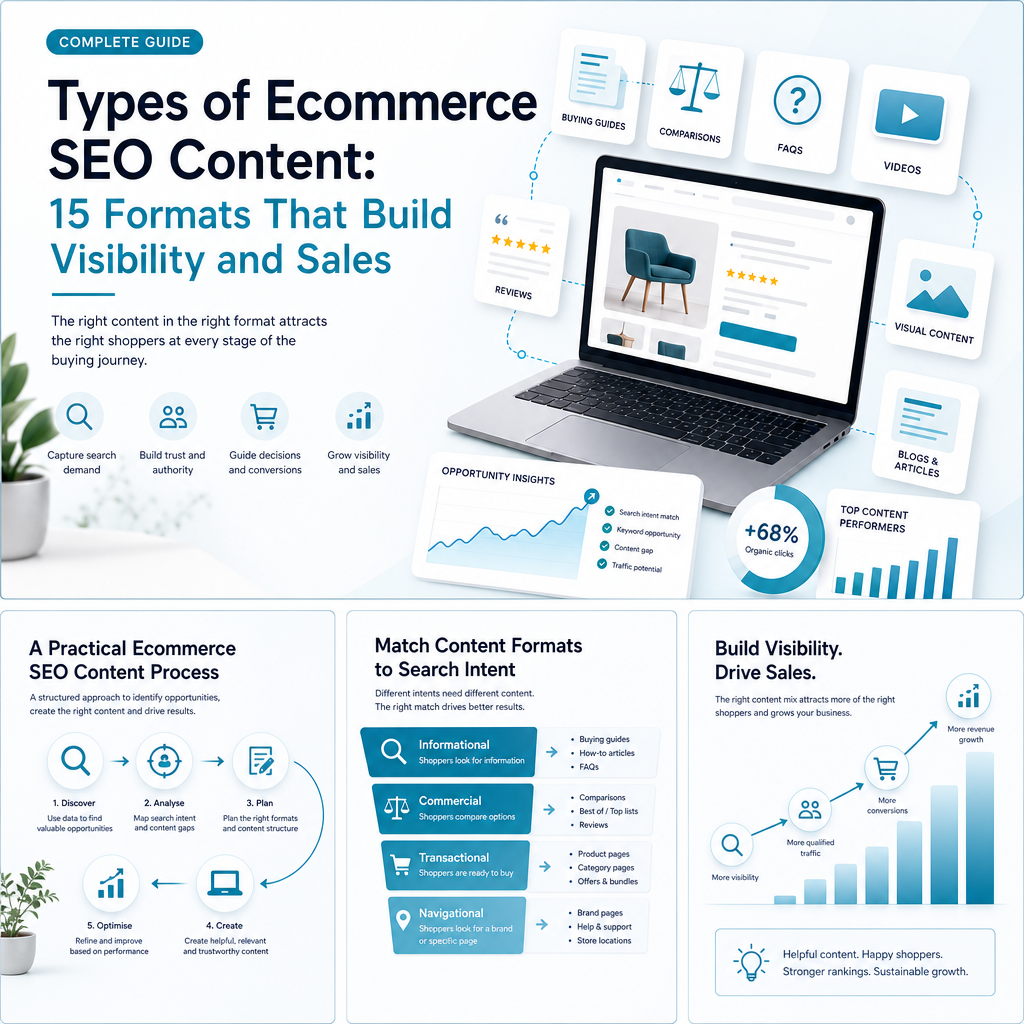
A repeatable process helps a small team create content that supports business goals rather than publishing based on guesswork.
1. Analyse Existing Search Performance
Review impressions, clicks, click-through rate, average position, landing pages and query themes in Google Search Console. Look for relevant searches where pages already have visibility but need stronger alignment, clearer metadata, better internal links or more useful content.
2. Map Keywords to Search Intent
Group keywords into informational, navigational, commercial and transactional intent. Assign one primary purpose to each page so that product, category, comparison and blog content do not compete for the same search.
3. Identify Competitor Content Gaps
Review the topics and formats used by pages ranking for your target searches. Look for missing information, weak product guidance, poor category copy, unanswered questions and opportunities to provide a more helpful experience.
4. Build a Semantic Content Map
Map related concepts, attributes, questions, products and categories around each topic. Semantic keyword mapping helps a page cover the subject naturally without repeating the same phrase.
5. Create and Optimise the Page
Write for the shopper first, then refine the title, headings, internal links, images, metadata and structured data. AI can speed up research, outlining and drafting, but content should reflect the business, catalogue and customer needs.
6. Publish, Monitor and Refresh
Track how pages perform after publication. Refresh content when products, prices, regulations, availability or customer questions change. Pages that already earn impressions can be strong candidates for improvement.
Common Ecommerce SEO Content Mistakes
Many ecommerce websites have plenty of pages but not enough useful content. Avoiding a few recurring problems can improve clarity and reduce wasted effort.
- Using copied manufacturer descriptions across multiple products.
- Creating category pages with only a product grid and no useful context.
- Indexing every filter combination without checking search demand.
- Publishing articles that do not link to relevant products or categories.
- Targeting the same keyword and intent on several competing pages.
- Using vague metadata that does not explain the page’s value.
- Ignoring mobile usability, image size and page performance.
- Creating pages for products or brands with no unique information.
- Leaving discontinued products without a plan for alternatives, redirects or retained information.
- Publishing large volumes of automatically generated content without review.
How Ammpli Helps Plan Ecommerce SEO Content
Choosing the right types of ecommerce SEO content is easier when your plan is based on your own search data rather than general assumptions. Ammpli combines Google Search Console and Analytics data with competitor research, search-intent analysis and semantic keyword mapping.
For a small ecommerce team, this can help identify pages and searches where there is already evidence of demand. Ammpli can highlight relevant opportunities where your website receives impressions but has not yet reached its strongest position, then turn those insights into a practical content calendar.
The platform supports SEO opportunity analysis, keyword and search-intent research, competitor content-gap analysis, semantic mapping, topical authority planning, AI-powered SEO content creation, local SEO content creation, direct CMS publishing and SEO performance reporting. This gives founders and marketing managers a way to create data-driven SEO content without paying for the cost or complexity of a traditional SEO agency.
A generic AI writing tool can produce text, but it may not know which categories matter most to your business, which queries already bring visibility or how your pages compare with the current search results. Ammpli connects content creation to those decisions so your publishing effort has a clearer commercial purpose.
Frequently Asked Questions
What are the most important types of ecommerce SEO content?
Start with unique product pages, useful category pages and content that supports purchase decisions, such as buying guides, comparisons and FAQs. The right priority depends on your catalogue, customer journey, current rankings and the searches where your website already receives impressions.
Should ecommerce businesses prioritise product pages or category pages?
Both matter, but category pages often provide a stronger starting point because they target broader commercial searches and connect to multiple products. Product pages should then be improved for specific models, features, sizes, materials and use cases. Google Search Console data can help show which page type has the clearest opportunity.
How can I avoid thin content on ecommerce pages?
Add information that is genuinely specific to the page, such as product attributes, selection guidance, use cases, compatibility details, customer questions, reviews or category-level advice. Do not create large numbers of near-identical pages from templates unless each page has enough unique value and a clear search purpose.
Is AI-generated content suitable for ecommerce SEO?
AI can assist with research, outlines, drafting, semantic coverage and content production, but it should be guided by real business information and reviewed for accuracy. The strongest approach combines AI efficiency with original product knowledge, customer insight, useful examples and accurate stock, pricing and policy information.
How often should ecommerce SEO content be updated?
Review pages when products, stock, prices, delivery details, regulations or customer questions change. High-value pages can also be reviewed regularly using performance data. A page receiving relevant impressions but few clicks may need a stronger title, clearer intent alignment, better content or improved internal linking.
How do I know which ecommerce SEO content opportunity to pursue first?
Prioritise opportunities that combine search relevance, business value and realistic competition. Pages with existing impressions, clear commercial intent and a reasonable gap between current visibility and stronger positions are often practical candidates. Ammpli helps identify these opportunities using Search Console data, competitor analysis and intent mapping.
Build a More Focused Ecommerce Content Plan
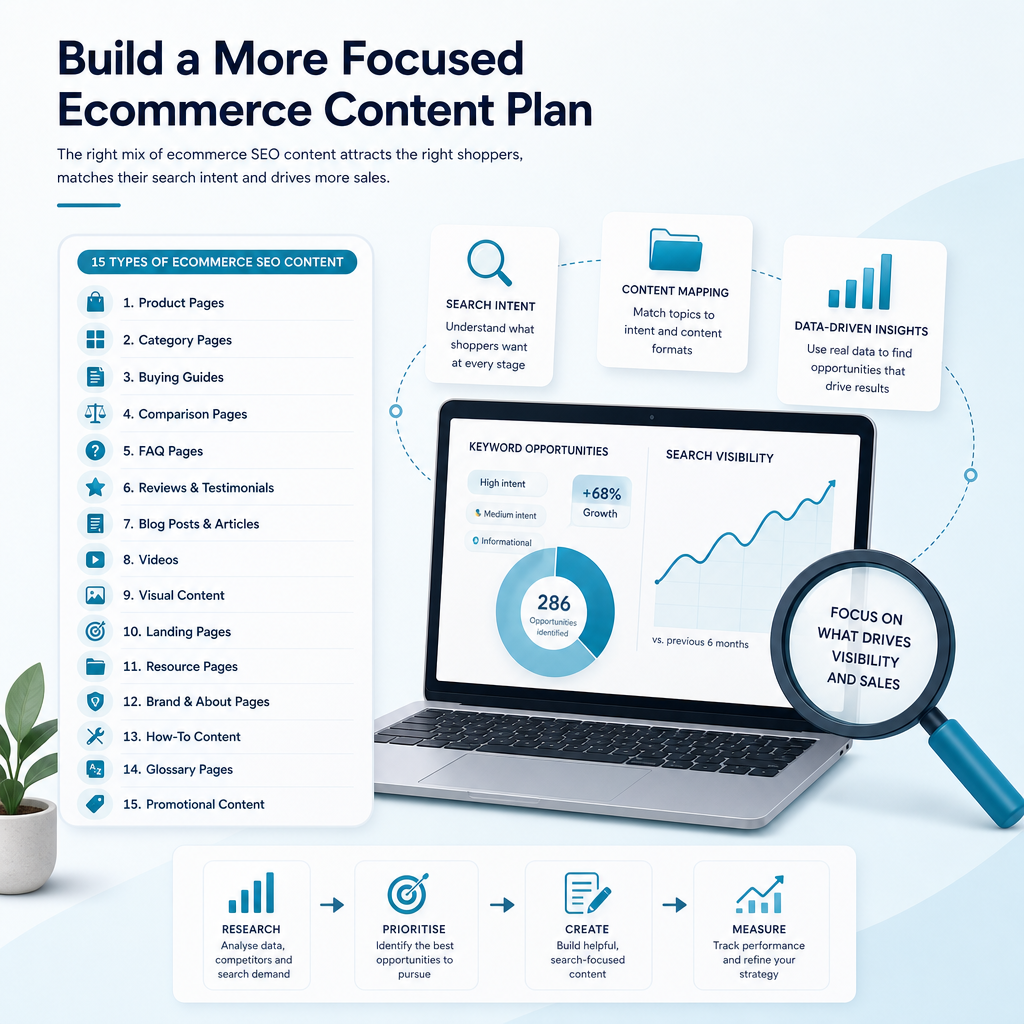
The best ecommerce SEO content strategy is not the one with the most formats. It is the one that connects the right page type to the right search intent, supports the customer journey and can be maintained by your team.
Begin with the pages closest to revenue, then add buying guidance, comparison content, FAQs and supporting resources where customers need more confidence. Review performance regularly and improve the pages that already show signs of search demand.
If you want to find your next ranking opportunity and turn your search data into better content, start your 14-day free trial with Ammpli. No credit card is required.